
Information security researchers recently uncovered a new malware campaign targeting employees of Web3 companies. The attackers pose as recruiters, contact candidates under the pretext of arranging an interview, and then suggest continuing the conversation through the site relay.lc.
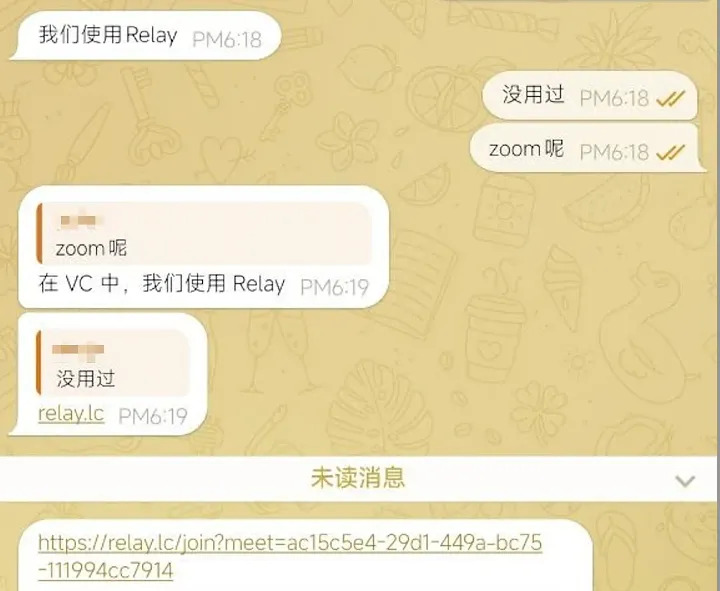
At first glance, the resource looks quite believable. It positions itself as a modern platform for online meetings powered by artificial intelligence. The site advertises features such as automatic real-time transcription of conversations, collaborative notes, AI summaries of meeting outcomes, task lists, and desktop applications for Windows and macOS.
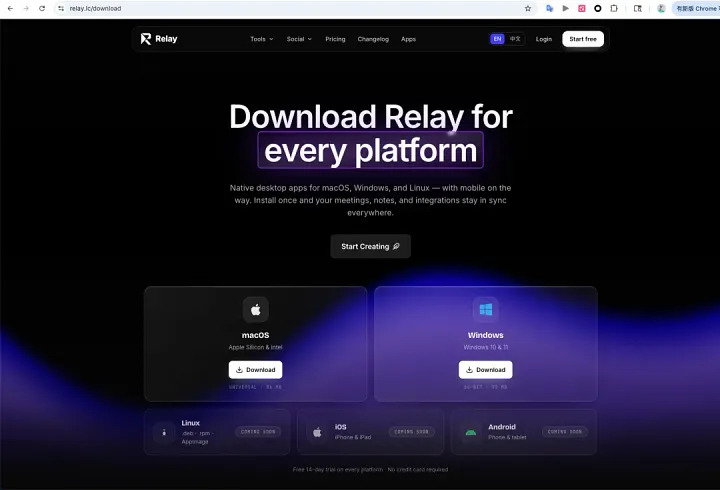
For someone going through a remote interview, this scenario looks entirely ordinary. A request to install a special application before the next stage of the interview raises no suspicion. What's more, the site's pages reinforce trust: they describe the service's capabilities in detail and offer downloads of the program for both Windows and macOS.
What happens after installation
On Mac computers, the user is asked to open the Terminal app, drag the downloaded file into its window, and press Enter.
On Windows, it looks even simpler: just run the installer and wait for the process to finish. A window with an update progress bar appears on screen, slowly filling to roughly 80%.
At first glance, one option resembles an ordinary manual installation, and the other a standard software update. But once you examine the contents of the installers, it turns out everything is arranged quite differently.
Infecting macOS: installation via Terminal
There is no real application inside the disk image. The Relay.dmg file is an ordinary macOS disk image. As a rule, legitimate programs for this operating system are distributed as an .app bundle that the user simply drags into the Applications folder.
There is neither a standard .app application nor a .pkg installer package inside. Meanwhile, the real executable is hidden in the .back directory, which is not shown in Finder by default.
Dragging into Terminal is not an installation
The authors even left comments, explaining that they skipped Apple's official code-signing and notarization procedure out of a desire to «reduce complexity» and «make the process simpler and more transparent». In reality, this is precisely where the key part of the attack is hidden.
How the attackers bypass macOS built-in protection
The command used by the attackers removes this quarantine attribute. No macOS vulnerability is exploited in the process. The user personally opens Terminal and runs the supplied script, which then removes the protective marker from the malicious file on its own.
As a result, what looks like an ordinary manual installation effectively turns into disabling one of the operating system's built-in security mechanisms.
Stealing passwords and Keychain data
Inside the hidden executable, many strings containing sensitive data are encrypted with a fixed key. Because of this, they cannot be found with an ordinary search through the program's text strings.
Once decrypted, it becomes clear that the program contains two remote addresses:
An AppleScript is also found that imitates a macOS system window:
«The current version of the application is not fully compatible with your version of macOS. For the program to work correctly, please enter your system password.»
The window has the title Application Error and looks like a genuine system alert. The input field masks typed characters with dots, so the user can easily mistake it for a standard macOS prompt for an administrator password.
But this window has nothing to do with system authentication. It is an ordinary AppleScript dialog created solely to capture the user's password. Once entered, the password is stored by the program under the label PWD and prepared for later transmission over the Internet.
Stealing the Keychain
Data collection does not end there. The malware contains code that reads the file:
After decrypting the code, it becomes clear that the attackers are interested in two objects at once:
Having obtained the Keychain file and the corresponding password, they can try to open this database on their own computer and gain access to all the credentials stored in it.
Telegram, Apple Notes, and system data at risk
In addition to browser data, the program contains code to steal information from Telegram Desktop. It tries to access the tdata directory, where Telegram stores local authorization data and the active user session.
If the attackers manage to copy this directory, they can restore the existing Telegram session on another computer and access the account without needing to re-enter the phone number or confirmation code.
No less interesting is the module designed to collect data from Apple Notes. The program sequentially iterates through all of the user's accounts, folders, and notes, reads the contents of each entry, and saves it to a separate HTML file, using the note's title as the file name.
Additionally, the program collects information about the system itself, including:
- the device's hardware UUID;
- the IP address;
- the country the user is operating from.
It also checks for the presence of popular apps for working with hardware crypto wallets: Ledger Live and Trezor Suite.
Why the trojan keeps running after Terminal is closed
During the investigation, the researchers also checked for mechanisms that would let the malware launch automatically after every reboot.
All the main persistence methods were examined, including:
- LaunchAgents;
- LaunchDaemons;
- the launchctl service;
- cron jobs;
- user login items.
According to the available data, no signs of a mechanism that would ensure automatic startup after a macOS reboot were found. Nevertheless, the nohup command used at launch allows the malicious process to keep running even after the Terminal window is closed.
In other words, the user may decide that the installation is complete and the program can be closed, while the malicious process keeps running in the background until it finishes its tasks.
Judging by the program's structure, its main goal is to gather as much data as possible in a single run, package it, and send it to a remote server.
Unlike the macOS version, the Windows variant uses several persistence mechanisms at once, creating entries in the Run and RunOnce sections of the Windows registry and placing itself in the startup folder even before the main data theft begins.
Infecting Windows: a fake update screen
The user sees an «update» that does not actually exist. The Windows version is a self-extracting executable created with the NSIS installer.
After extraction, inside is an application built on Electron version 2.9.0. It is what shows the user an interface with the Relay logo and a constantly moving progress bar. During the «update», the following messages appear in sequence:
All of this creates the impression that a genuine update is taking place. But code analysis revealed a completely different picture. The progress bar has nothing to do with downloading files, checking the system, or installing the application.
Its value starts at 4% and then increases every 1.4 seconds by a random number from 0 to 11. The messages also change automatically, based solely on the progress bar's value, and in no way reflect the program's real actions.
When the indicator reaches 80%, the process suddenly stops. But instead of completing the installation, the application sends an internal message named runUpdate. It is right after this that the next stage of the attack begins.
The virus tries to gain administrator rights
When the loading indicator reaches 80%, the application sends the internal command runUpdate.
During code analysis, a module that receives this command was discovered. Alongside it, the researchers found the path to the file updater.exe and a PowerShell command intended to launch it:
This command does several things at once. First, it disables PowerShell's standard security policy, allowing the program to run without additional restrictions. Then it requests elevated privileges through the Windows User Account Control (UAC) mechanism. After that, it launches the process in hidden mode so the user sees no extra windows.
The updater.exe file itself is about 116 MB in size and carries no digital signature confirming its origin. Moreover, its configuration explicitly states that it requires administrator rights to run.
The investigation showed that inside this file are modules designed to collect information from browsers, Telegram, desktop cryptocurrency wallets, and the operating system itself.
In addition, the program includes another embedded executable. Its task is much narrower: to ensure the malware persists in the system after a reboot and to analyze the memory of the Chrome and Brave browser processes.
How the trojan persists in the system
The embedded module has the internal name callsoul. Once launched, its first order of business is to ensure it starts automatically after every Windows reboot.
To do this, the program copies itself to the directory:
After copying, the file is given the hidden and system attributes, so in the standard Windows File Explorer the user won't see it without enabling the display of hidden files.
The program then tries to register itself in several independent ways at once. It creates entries in the Run section of the system registry, then does the same in the RunOnce section, and also adds a shortcut to the Windows startup folder.
It uses perfectly innocuous names - WindowsSysUpdateCheck and Windows Update - so the entries look like components of the operating system itself and raise no suspicion.
The program does not limit itself to a single persistence method. It uses all three in sequence. It is enough for just one of them to work for the malware to launch automatically after every reboot. Only after finishing its attempts to persist does the program move on to the next stage - analyzing the memory of the browser processes.
Analyzing the memory of Chrome and Brave browsers
The most unusual feature of the Windows version is that it does not limit itself to stealing browser profile files, as most similar malware does.
Instead, it tries to access the memory of the running Chrome and Brave processes directly. First, the program iterates through all active Windows processes and looks for those that belong to Chrome or Brave and are responsible for running browser extensions.
After finding the right process, it opens it with rights that allow reading the memory contents. It then sequentially scans the allocated memory regions, extracting all available data.
The collected information is analyzed in search of the string syncPasswordAndUnlockWallet - the internal name of a method related to unlocking cryptocurrency wallets that run as browser extensions.
If such a string is found, the program tries to extract the nearby parameters contained in a JSON structure. It is these values that are then prepared for sending to a remote server.
The stolen data is sent to a remote server
After extracting the information from the browser's memory, the program builds a small JSON object that includes three values: the unique identifier of the installed Windows copy (MachineGuid), the browser-extension-related parameter found in memory, and an indication of which browser the data came from - Chrome or Brave.
The program then tries to send the assembled data via an HTTPS request to a remote server at:
This address is used as the main channel for transmitting the most valuable information the malware manages to collect.
An additional exfiltration channel via Sentry
The investigation also showed that the program uses the Sentry service.
In this case, however, it is used in a completely different way.
In various parts of the code, calls were found to functions that send Sentry messages about the program's progress, the errors that arise, and its various stages. Along with them, additional service information is transmitted: the computer identifier, the process identifier, the name of the browser in use, and the internal labels of the program's stages - for example Init, Conn, and Success.
Of particular interest is the handler responsible for sending the results of the main POST request. In this part of the code, the researchers found that the data structure containing the parameters h, v, and b is also transmitted via Sentry.
Despite this, the main channel for transmitting confidential information remains the cdnresolver.com server. The use of Sentry most likely serves as an additional tool that lets the malware's operators monitor the success of infections and track the operation of their own software.
Another coincidence is noteworthy. Analysis of the macOS version revealed the very same domains e1.cdnresolver.com and a2.cdnresolver.com. Although the macOS and Windows installers are built on completely different technologies, both ultimately communicate with the same infrastructure.
Sentry as an additional data channel
While analyzing the Windows version, researchers found another interesting detail. Inside the compiled bytecode of the main process, a string had been left behind:
It has nothing to do with the Relay brand under which the application was distributed. Moreover, the name of the file sysupdwin.exe, into which the program copies itself after launch, as well as the WindowsSysUpdateCheck entry created in the system registry, likewise do not match Relay's branding.
The names of these processes are an exact match for those used in the sample under study.
Nevertheless, the study's authors emphasize that they were unable to obtain the original FYMeet sample. So for now one can only speak of a match in file names and certain infrastructure elements. It is premature to conclude that both campaigns are run by the same group of attackers or share common source code.
Conclusions: one run - access to all data
The investigation began after reports from community members who drew attention to the relay.lc site. The analysis revealed that the attackers had prepared two completely different infection scenarios - one for macOS users and one for Windows. Despite the differences in implementation, both installers pursue the same goal: to gain the broadest possible access to the victim's confidential data.
The entire attack chain is built around the habits of each operating system's users.
On macOS, the attackers use an unusual but psychologically convincing trick. The user is asked to install the application by dragging a file into the Terminal window. At first glance this looks like a non-standard but perfectly acceptable installation method. In practice, however, it runs a script that removes the file's system origin marker, bypassing one of macOS's built-in security warnings, and then covertly launches the malware.
On Windows, a completely different approach is used. Instead, the user sees a plausible update screen with a progress bar. In the best case, the move to the next stage happens after about ten seconds, but the maximum wait time is not limited in the code at all. As soon as the bar reaches 80%, the program sends the internal command runUpdate. Bytecode analysis showed that the unsigned file updater.exe is then supposed to launch, and with a request for administrator rights.
The approach to stealing data also differs by platform.
In the macOS version, the user is shown a fake system window asking for a password. At the same time, the program gains access to the Keychain database, which stores passwords and other secrets. The entered password and the Keychain contents are then combined into a single package meant for sending to a remote server.
On Windows, the main emphasis is on persisting in the system and then analyzing the memory of the Chrome and Brave browsers. The malware looks for information related to unlocking cryptocurrency wallets, extracts the necessary parameters, and sends them to the remote infrastructure in a specially crafted JSON request.
The investigation shows that the potential damage is far broader than the compromise of a single cryptocurrency wallet.
The program's code contains modules or direct references to mechanisms for collecting data from browsers, password managers, Keychain contents, local Telegram data, Apple Notes, and various device information. This means that after a single successful infection, the attackers can potentially gain access not only to the user's personal data but also to corporate accounts, cloud services, internal company systems, and other critical resources.
Recommendations for those affected
If the file was only downloaded but the user did not run it, it is enough to delete the downloaded DMG or EXE file, empty the Trash, and block all the domains, URLs, and hashes listed in the research using DNS filtering, security gateways, or EDR solutions.
If the malware was run on macOS (the user dragged the file into Terminal and pressed Enter), the device should be immediately disconnected from the network but, if possible, not rebooted until forensic analysis is complete.
If the user entered a password into the fake window, one should assume the attackers may have obtained both the password itself and the Keychain contents.
If the infection occurred on Windows, the computer must be immediately isolated from the network, and any actions involving entering passwords or unlocking cryptocurrency wallets must be stopped.
If browser-based cryptocurrency wallets were used, one should assume that the data related to unlocking them may have been exposed, and move the assets to new wallets created on a secure device.
All the recommendations above are based on a maximally conservative risk assessment, drawing on the capabilities confirmed during the code analysis.
It is important to keep in mind that the malware analyzes parameters already present in the memory of browser extensions or appearing there as they operate. In addition, stolen cookies and tokens may remain valid even without a password change. For this reason, the investigation of such incidents should not be limited to checking whether cryptocurrency assets were stolen - the consequences of an infection may turn out to be far more extensive.
